333OK Deposit and Withdrawal Guide
333OK is a reputable online betting platform in Asia, offering a range of services from sports betting, online casino and e-sports to lottery. To start betting, users need to deposit and withdraw funds. All transactions on 333OK are secure and fast. The deposit steps are listed below.
How to Deposit on 333OK
🌾 Step 1: Log in to your account. In the account management section, click the “Deposit” button.
🌾 Step 2: On the deposit page, select a deposit method. Then choose the appropriate payment channel.
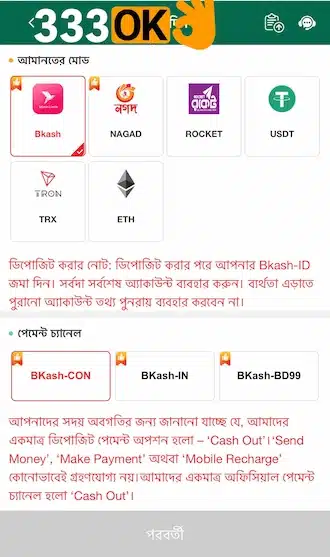
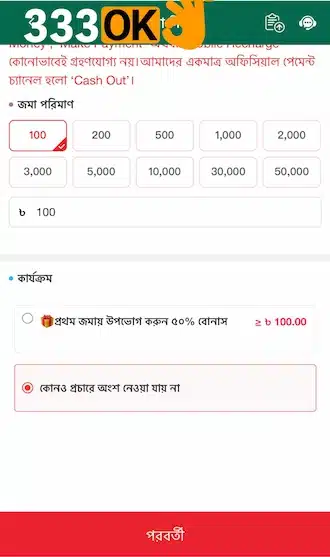
🌾 Step 3: Enter the deposit amount. The minimum is 100 Taka and the maximum is 50,000 Taka.
🌾 Step 4: If there is a deposit offer available, select it. Then click the “Confirm” button.
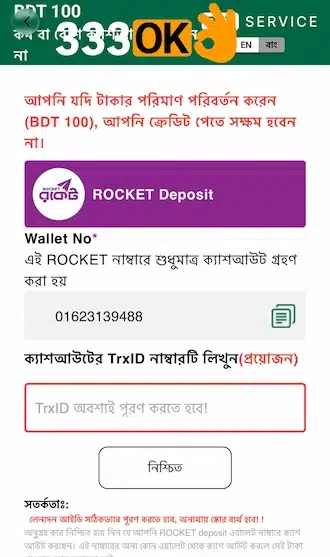
🌾 Step 5: The system will show the deposit order. Open your e-wallet and complete the deposit order. Enter the transaction TrxID to finish the transaction. The funds will be credited to your account within a few minutes.
How to Withdraw from 333OK
🍃 Step 1: Log in to your betting account. In the account management section, select the “Withdraw” option.
🍃 Step 2: On the withdrawal page, choose a withdrawal account type. Then click the red plus icon.
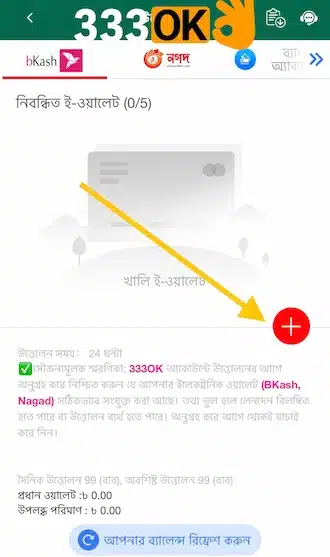
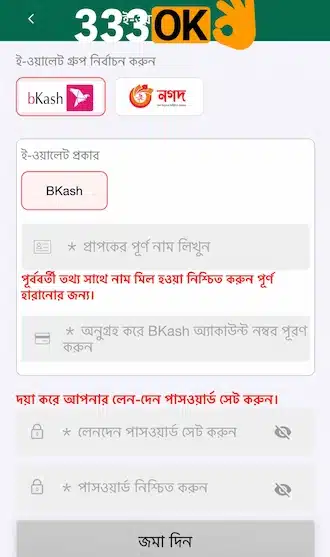
🍃 Step 3: Add the withdrawal address information. Enter the account holder’s name and the withdrawal account number.
🍃 Step 4: Enter the 6-digit withdrawal password. Enter it again for confirmation.
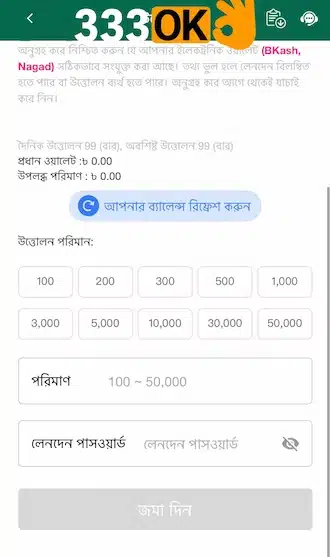
🍃 Step 5: Return to the withdrawal page. Click the option to withdraw balance from the main wallet.
🍃 Step 6: Enter the withdrawal amount (limit: 200–50,000 Taka). Then enter the withdrawal password.
🍃 Step 7: Check all information once again. If everything is correct, submit the withdrawal request.
Important Deposit and Withdrawal Guidelines on 333OK
Important deposit and withdrawal points for the Bangladesh market on 333OK are listed below:

🍄 Name and Bank Information Must Match
The name on the 333OK account and the name on the bKash, Nagad, Rocket or bank account must be the same. If someone else’s account is used, the transaction will be cancelled.
🍄 Phone Number Verification
Use your own phone number during transactions, and the number must be active.
🍄 Transaction ID (TxID)
Copy the transaction ID from the deposit or withdrawal notification and paste it into the correct field.
🍄 Keep a Screenshot
After each transaction, save a screenshot or receipt as proof.
🍄 Bonus and Wagering Requirements
If you receive a deposit bonus, you cannot withdraw until the required wagering requirements are completed.
🍄 Daily Limit
Check the website to see the allowed minimum and maximum number of withdrawals and amounts within every 24 hours.
🍄 Use Your Own Wallet
Always use your own bKash or Nagad number when withdrawing. Do not provide an agent’s number.
🍄 Do Not Make Transactions During Maintenance
If you make a transaction during bKash, Nagad or bank maintenance, there is a risk that the money may be held. Avoid transactions during this time.
🍄 Contact Support If There Is a Delay
If a transaction takes longer than usual, contact official support directly. Do not enter your information through any third-party link.